 优医问诊H5
登录-效果图
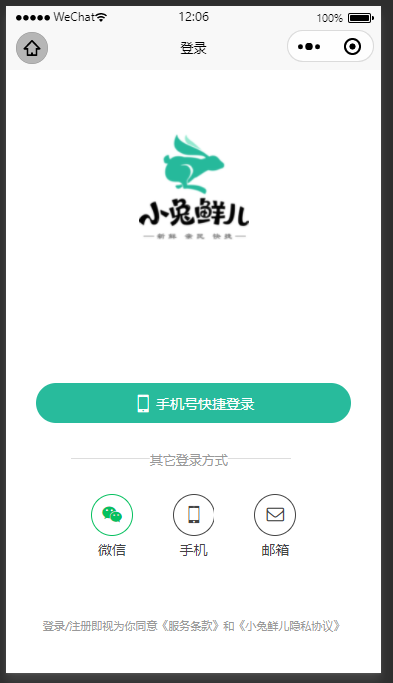
登录-静态结构
src\pages\login\index.vue
<template>
  <view class="viewport">
    <view class="logo">
      <image
        src="https://static.botue.com/erabbit/static/images/logo_icon.png"
      ></image>
    </view>
    <view class="login">
      <button
        class="button phone"
      >
        <text class="icon icon-phone"></text>
        微信手机号快捷登录
      </button>
      <view class="extra">
        <view class="caption">
          <text>其它登录方式</text>
        </view>
        <view class="options">
          <button >
            <text class="icon icon-weixin">微信</text>
          </button>
          <button >
            <text class="icon icon-phone">手机</text>
          </button>
          <button >
            <text class="icon icon-mail">邮箱</text>
          </button>
        </view>
      </view>
      <view class="tips"
        >登录/注册即视为你同意《服务条款》和《小兔鲜儿隐私协议》</view
      >
    </view>
  </view>
</template>
<style lang="scss">
page {
  height: 100%;
}
.viewport {
  display: flex;
  flex-direction: column;
  height: 100%;
  padding: 20rpx 40rpx;
}
.logo {
  flex: 1;
  text-align: center;
  image {
    width: 220rpx;
    height: 220rpx;
    margin-top: 100rpx;
  }
}
.login {
  display: flex;
  flex-direction: column;
  height: 600rpx;
  padding: 40rpx 20rpx 20rpx;
  .button {
    display: flex;
    align-items: center;
    justify-content: center;
    width: 100%;
    height: 80rpx;
    font-size: 28rpx;
    border-radius: 72rpx;
    color: #fff;
    .icon {
      font-size: 40rpx;
      margin-right: 6rpx;
    }
  }
  .phone {
    background-color: #28bb9c;
  }
  .wechat {
    background-color: #06c05f;
  }
  .extra {
    flex: 1;
    padding: 70rpx 70rpx 0;
    .caption {
      width: 440rpx;
      line-height: 1;
      border-top: 1rpx solid #ddd;
      font-size: 26rpx;
      color: #999;
      position: relative;
    }
    .options {
      display: flex;
      justify-content: center;
      margin-top: 70rpx;
    }
    .icon {
      text-align: center;
      font-size: 28rpx;
      color: #444;
      &::before {
        display: flex;
        align-items: center;
        justify-content: center;
        width: 80rpx;
        height: 80rpx;
        margin-bottom: 6rpx;
        font-size: 40rpx;
        border: 1rpx solid #444;
        border-radius: 50%;
      }
    }
    .icon-weixin {
      &::before {
        border-color: #06c05f;
        color: #06c05f;
      }
    }
  }
  .caption {
    text {
      transform: translate(-40%);
      background-color: #fff;
      position: absolute;
      top: -12rpx;
      left: 50%;
    }
  }
  .options {
    button {
      line-height: 1;
      padding: 0;
      margin: 0 40rpx;
      background-color: transparent;
    }
  }
  .tips {
    position: absolute;
    bottom: 80rpx;
    left: 20rpx;
    right: 20rpx;
    font-size: 22rpx;
    color: #999;
    text-align: center;
  }
}
</style>登录-正式业务
目标:实现通过微信绑定的手机号,快捷登录
思路:
- 小程序的button中内置了操作类型
"getPhoneNumber"。 - 可以通过
open-type="getPhoneNumber"快速获取到,微信绑定的手机号码数据。 - 用获取的手机号数据,调用后台接口,换取token等信息
步骤:
- 封装登录API接口函数
- 修改
button的open-type为"getPhoneNumber", 并监听getphonenumber事件 - 通过事件对象, 获取 手机号码数据
encryptedData、iv - 调用微信
wx.login获取 临时登录凭据code - 调用 登录接口,获取 token
- TODO:存入 vuex 中,并返回上一个页面
代码:
- 封装登录API接口函数:
api/profile.js
/**
 * 小程序登录
 * @param {string} encryptedData 加密的手机号信息 getphonenumber事件回调中获取
 * @param {string} iv 加密相关 getphonenumber事件回调中获取
 * @param {string} code 通过 wx.login() 获取
 */
export const loginByWXAPI = (data) => {
  return http({
    url: "/login/wxMin",
    method: "POST",
    data,
  });
};- 修改
button的open-type为"getPhoneNumber", 并监听getphonenumber事件
<button
  class="button phone"
+ open-type="getPhoneNumber"
+ @getphonenumber="onGetPhone"
>
  <text class="icon icon-phone"></text>
  手机号快捷登录
</button>- 通过事件对象, 获取 手机号码数据
encryptedData、iv
async handleGetPhoneNumber(e) {
  console.log("  ----->  ", e.detail);
  // 返回用户的加密信息 - 有后台小哥需要的encryptedData和 iv,code 需要使用 uni.login获取
  const { encryptedData, iv } = e.detail;

  // 4. 调用微信 `wx.login` 获取 临时登录凭据 `code`
  const [err, { code }] = await uni.login();

  // 5. 调用 登录接口,获取 token
  const res = await postLoginWxMin({
    encryptedData,
    iv,
    code: this.code,
  });

  // 6. TODO: 存入 vuex 中,并返回上一个页面
},登录-测试业务
目标:企业小程序,最多支持200个开发者账号。为了业务完整性,使用测试接口完成登录
步骤:
- 封装测试登录API
- 准备普通的button,并绑定点击事件
- 调用API
- 存token,提示用户、跳转路由
代码:
- 封装测试登录API:
api/profile.js
import request from "@/utils/http";

export const loginByTestPhoneAPI = (phoneNumber) => {
  return request({
    url: "/login/wxMin/simple",
    method: "post",
    data: {
      phoneNumber,
    },
  });
};- 准备普通的button,并绑定点击事件
src/pages/login/index.vue
<button class="button phone" @click="loginByTestPhone">
  <text class="icon icon-phone"></text>
  测试手机号码登录
</button>- 调用API,存token,提示用户、跳转路由
async loginByTestPhone() {
  const { result } = await loginByTestPhoneAPI("13577778888");
  console.log("result  ----->  ", result);
  // TODO: 存token
  uni.showToast("登录成功");
  setTimeout(() => {
    uni.navigateBack();
    // 💥💥 延迟1.5秒,是因为toast显示时间为1.5秒
  }, 1500);
},登录-vuex 实现逻辑
目标:token、用户头像等信息需要再多个页面间共享,将登录后token等信息存入到vuex中
src/store/modules/user.js
import { loginByTestPhoneAPI } from "@/api/profile";

export default {
  // 命名空间
  namespaced: true,
  state: {
    // 1. 声明数据
    profile: null,
  },
  mutations: {
    // 4. 声明mutation方法,修改state
    saveProfile(state, payload) {
      console.log("state, payload  ----->  ", state, payload);
      state.profile = payload;
    },
  },
  actions: {
    // 2. 声明action方法
    async loginByTestPhone({ commit }) {
      const { result } = await loginByTestPhoneAPI("13577778888");
      // 3. 调用mutation修改方法
      commit("saveProfile", result);

      uni.showToast("登录成功");
      setTimeout(() => {
        uni.navigateBack();
      }, 1500);
    },
  },
};store/index.js
import user from "./modules/user";
// ... 省略其它代码 ...


const store = new Vuex.Store({
	// ... 省略其它代码 ...
  modules: {
    // 💥💥 5. 容易忘记注册模块
    user,
  },
});
export default store;pages/login/index.vue
<script>
+ import { mapActions } from "vuex";
export default {

  methods: {

-  	async loginByTestPhone() {
-      const { result } = await loginByTestPhoneAPI("13577778888");
-      // ... 省略其它
-    },

+   // 6. 使用mapActions获取action函数
+   ...mapActions("user", ["loginByTestPhone"]),

  },
};
</script>个人中心-效果图
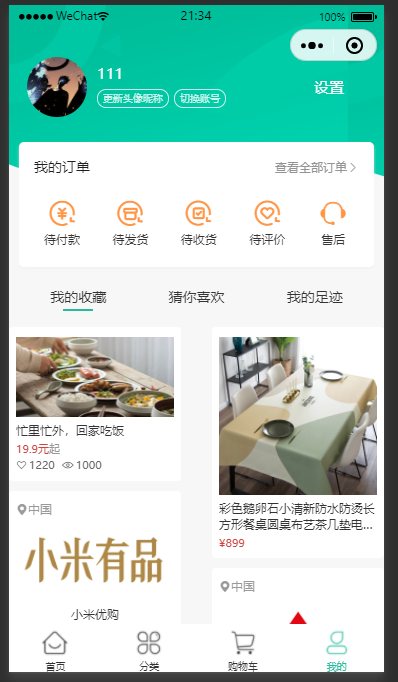
个人中心-静态结构(复制)
src\pages\my\index.vue
<template>
  <scroll-view enhanced scroll-y id="scrollView">
    <view class="viewport" :style="{ paddingTop: 0 + 'px' }">
      <!-- 顶部背景 -->
      <view class="navbar" :style="{ paddingTop: 0 + 'px' }"> </view>

      <view class="profile">
        <view class="overview">
          <!-- 个人资料 - 未登录 -->
          <navigator url="/pages/login/index" hover-class="none">
            <image
              class="avatar"
              src="http://static.botue.com/erabbit/static/uploads/avatar_3.jpg"
            />
          </navigator>
          <view class="meta">
            <navigator
              url="/pages/login/index"
              hover-class="none"
              class="nickname"
            >
              未登录
            </navigator>
            <view class="extra">
              <text class="tips">点击登录账号</text>
            </view>
          </view>
        </view>
      </view>

      <view class="profile">
        <!-- 个人资料 - 已登录 -->
        <view class="overview">
          <navigator url="/pages/my/profile" hover-class="none">
            <image
              mode="aspectFill"
              class="avatar"
              src="http://static.botue.com/erabbit/static/uploads/avatar_3.jpg"
            />
          </navigator>

          <view class="meta">
            <view class="nickname"> {{ "张三" }} </view>

            <view class="extra">
              <template>
                <text class="update">更新头像昵称</text>
              </template>
            </view>
          </view>
        </view>
        <navigator class="settings" url="/pages/my/settings" hover-class="none">
          设置
        </navigator>
      </view>

      <!-- 订单 -->
      <!-- 我的收藏 -->
      <!-- 商品列表 -->
    </view>
  </scroll-view>
</template>

<script>
export default {};
</script>

<style lang="scss">
page {
  height: 100%;
  overflow: hidden;
  background-color: #f7f7f8;
}
#scrollView {
  height: 100%;
  overflow: hidden;
}

.navbar {
  width: 750rpx;
  height: 380rpx;
  background-image: url(http://static.botue.com/erabbit/static/images/center_bg.png);
  background-size: contain;
  position: fixed;
  top: 0;
  left: 0;
  z-index: 9;
  .title {
    height: 64rpx;
    line-height: 64rpx;
    text-align: center;
    color: #fff;
    font-size: 32rpx;
    opacity: 1;
    font-weight: bold;
  }
}
.profile {
  position: relative;
  z-index: 99;
  .overview {
    display: flex;
    width: 500rpx;
    height: 120rpx;
    padding: 0 36rpx;
    color: #fff;
    .avatar {
      width: 120rpx;
      height: 120rpx;
      border-radius: 50%;
    }
    .meta {
      display: flex;
      flex-direction: column;
      justify-content: center;
      align-items: flex-start;
      line-height: 30rpx;
      padding: 16rpx 0;
      margin-left: 20rpx;
    }
  }
  .meta {
    .nickname {
      max-width: 180rpx;
      margin-bottom: 16rpx;
      font-size: 30rpx;
      overflow: hidden;
      text-overflow: ellipsis;
      white-space: nowrap;
    }
    .extra {
      display: flex;
      font-size: 20rpx;
    }
    .tips {
      font-size: 22rpx;
    }
  }
  .settings {
    position: absolute;
    top: 50%;
    right: 80rpx;
    line-height: 1;
    font-size: 30rpx;
    color: #fff;
    transform: translateY(-50%);
  }
}
.profile .meta .update,
.profile .meta .relogin {
  padding: 3rpx 10rpx 1rpx;
  color: rgba(255, 255, 255, 0.8);
  border: 1rpx solid rgba(255, 255, 255, 0.8);
  margin-right: 10rpx;
  border-radius: 30rpx;
}
.orders {
  position: sticky;
  top: 140rpx;
  z-index: 99;
  padding: 30rpx;
  margin: 50rpx 20rpx 0;
  background-color: #fff;
  border-radius: 10rpx;
  box-shadow: 0 4rpx 6rpx rgba(240, 240, 240, 0.6);
  .title {
    height: 40rpx;
    line-height: 40rpx;
    font-size: 28rpx;
    color: #1e1e1e;
    navigator {
      font-size: 24rpx;
      color: #939393;
      float: right;
    }
  }
  .section {
    width: 100%;
    display: flex;
    justify-content: space-between;
    padding: 40rpx 20rpx 10rpx;
    navigator {
      text-align: center;
      font-size: 24rpx;
      color: #333;
      &::before {
        display: block;
        font-size: 60rpx;
        color: #ff9545;
      }
    }
  }
}
/* 小部件 */
.widgets {
  padding: 20rpx 20rpx 0;
  background-color: #f7f7f8;
  position: relative;
  z-index: 1;
  .tabs {
    display: flex;
    justify-content: space-around;
    height: 80rpx;
    line-height: 80rpx;
    text {
      font-size: 28rpx;
      color: #333;
      position: relative;
    }
    .active {
      &::after {
        position: absolute;
        left: 50%;
        bottom: 12rpx;
        width: 60rpx;
        height: 4rpx;
        background-color: #27ba9b;
        content: "";
        transform: translate(-50%);
      }
    }
  }
}
</style>个人中心-个人资料
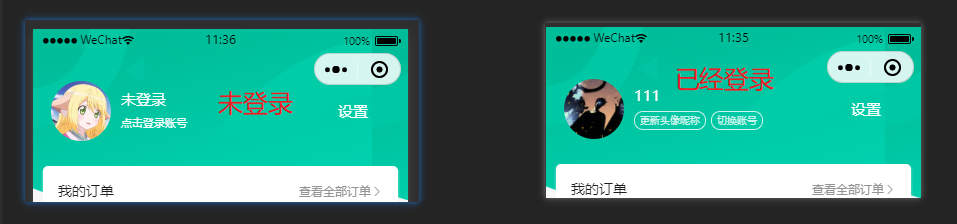
目标:1.修复样式从胶囊底部开始排版。 2. 条件渲染
步骤:
- 获取胶囊按钮的位置信息
- 设置paddingTop
- 从vuex中获取用户信息
- 条件渲染
代码:
<script>
+import { mapState } from "vuex";
export default {
+  computed: {
		 // 1. 获取胶囊按钮的位置信息
+    ...mapState(["capButton"]),
		 // 3. 从vuex中获取用户信息
+    ...mapState("user", ["profile"]),
+  },
};
</script>

<template>
  <scroll-view enhanced scroll-y id="scrollView">
+   <view class="viewport" :style="{ paddingTop: capButton.bottom + 'px' }">
      <!-- 顶部背景 -->
+     <view class="navbar" :style="{ paddingTop: capButton.bottom + 'px' }" />

			<!-- 个人资料 - 未登录 -->
			4. 条件渲染
+     <view class="profile" v-if="!profile">
        <view class="overview">

         ... 省略其它代码 ...

        </view>
      </view>

      <view class="profile" v-else>
        <!-- 个人资料 - 已登录 -->
        <view class="overview">
          <navigator url="/pages/my/profile" hover-class="none">
            <image
              mode="aspectFill"
              class="avatar"
-             src="http://static.botue.com/erabbit/static/uploads/avatar_3.jpg"
+             :src="profile.avatar"
            />
          </navigator>

          <view class="meta">
-          	<view class="nickname"> {{ '张三' }} </view>
+           <view class="nickname"> {{ profile.nickname }} </view>

            ... 省略其它代码 ...
          </view>
        </view>
        ... 省略其它代码 ...
      </view>
    </view>
  </scroll-view>
</template>我的订单
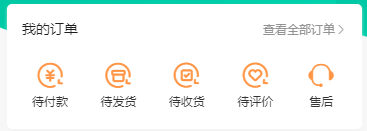
数据
data() {
    return {
      orderTypes: [
        { text: "待付款", icon: "icon-currency", type: 1 },
        { text: "待发货", icon: "icon-gift", type: 2 },
        { text: "待收货", icon: "icon-check", type: 3 },
        { text: "待评价", icon: "icon-comment", type: 4 },
      ]
    }
},代码
<view class="orders">
    <view class="title">
      我的订单
      <navigator url="/pages/order/index?type=0" hover-class="none">
        查看全部订单<text class="icon-right"></text>
      </navigator>
    </view>
    <view class="section">
      <navigator
        v-for="item in orderTypes"
        :key="item.text"
        :class="item.icon"
        :url="'/pages/order/index?type=' + item.type"
        hover-class="none"
        >{{ item.text }}</navigator
      >
      <navigator class="icon-handset" url=" " hover-class="none"
        >售后</navigator
      >
    </view>
</view>我的收藏

数据
data() {
    return {
      tabs: ["我的收藏", "猜你喜欢", "我的足迹"],
      tabIndex: 0,
    };
},代码
<view class="widgets">
    <view class="tabs">
      <text
        v-for="(item, index) in tabs"
        :key="item"
        :class="{ active: tabIndex === index }"
        @click="tabIndex =index"
        >{{ item }}</text
      >
    </view>
</view>商品列表
src\pages\my\components\CollectGoods.vue
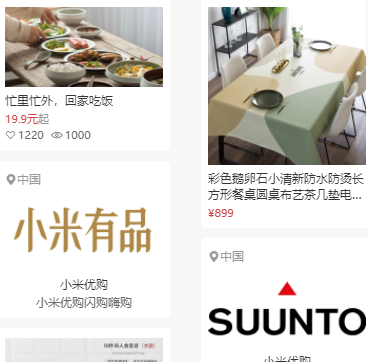
- 都是静态结构,接受外部数据
tabIndex即可
<template>
  <view class="masonry">
    <template v-if="tabIndex === 0">
      <view class="column">
        <view class="card topic">
          <image
            mode="widthFix"
            src="http://static.botue.com/erabbit/static/uploads/topic_1.jpg"
          ></image>
          <view class="name">忙里忙外,回家吃饭</view>
          <view class="price">19.9元<text>起</text></view>
          <view class="extra">
            <text class="icon-heart">1220</text>
            <text class="icon-preview">1000</text>
          </view>
        </view>
        <view class="card brand">
          <view class="locate"> <text class="icon-locate"></text>中国 </view>
          <image
            mode="widthFix"
            src="http://static.botue.com/erabbit/static/uploads/brand_logo_6.jpg"
          ></image>
          <view class="name">小米优购</view>
          <view class="alt">小米优购闪购嗨购</view>
        </view>
        <view class="card goods">
          <image
            mode="widthFix"
            src="http://static.botue.com/erabbit/static/uploads/goods_big_6.jpg"
          ></image>
          <view class="name"
            >彩色鹅卵石小清新防水防烫长方形餐桌圆桌布艺茶几垫电视柜盖布
            鹅软石桌布yg056</view
          >
          <view class="price">¥899</view>
        </view>
        <view class="card brand">
          <view class="locate"> <text class="icon-locate"></text>中国 </view>
          <image
            mode="widthFix"
            src="http://static.botue.com/erabbit/static/uploads/brand_logo_8.jpg"
          ></image>
          <view class="name">小米优购</view>
          <view class="alt">小米优购闪购嗨购</view>
        </view>
        <view class="card goods">
          <image
            mode="widthFix"
            src="http://static.botue.com/erabbit/static/uploads/goods_big_7.jpg"
          ></image>
          <view class="name"
            >彩色鹅卵石小清新防水防烫长方形餐桌圆桌布艺茶几垫电视柜盖布
            鹅软石桌布yg056</view
          >
          <view class="price">¥899</view>
        </view>
      </view>
      <view class="column">
        <view class="card goods">
          <image
            mode="widthFix"
            src="http://static.botue.com/erabbit/static/uploads/goods_big_5.jpg"
          ></image>
          <view class="name"
            >彩色鹅卵石小清新防水防烫长方形餐桌圆桌布艺茶几垫电视柜盖布
            鹅软石桌布yg056</view
          >
          <view class="price">¥899</view>
        </view>
        <view class="card brand">
          <view class="locate"> <text class="icon-locate"></text>中国 </view>
          <image
            mode="widthFix"
            src="http://static.botue.com/erabbit/static/uploads/brand_logo_7.jpg"
          ></image>
          <view class="name">小米优购</view>
          <view class="alt">小米优购闪购嗨购</view>
        </view>
        <view class="card topic">
          <image
            mode="widthFix"
            src="http://static.botue.com/erabbit/static/uploads/topic_2.jpg"
          ></image>
          <view class="name">忙里忙外,回家吃饭</view>
          <view class="price">19.9元<text>起</text></view>
          <view class="extra">
            <text class="icon-heart">1220</text>
            <text class="icon-preview">1000</text>
          </view>
        </view>
        <view class="card brand">
          <view class="locate"> <text class="icon-locate"></text>中国 </view>
          <image
            mode="widthFix"
            src="http://static.botue.com/erabbit/static/uploads/brand_logo_5.jpg"
          ></image>
          <view class="name">小米优购</view>
          <view class="alt">小米优购闪购嗨购</view>
        </view>
        <view class="card goods">
          <image
            mode="widthFix"
            src="http://static.botue.com/erabbit/static/uploads/goods_big_3.jpg"
          ></image>
          <view class="name"
            >彩色鹅卵石小清新防水防烫长方形餐桌圆桌布艺茶几垫电视柜盖布
            鹅软石桌布yg056</view
          >
          <view class="price">¥899</view>
        </view>
      </view>
    </template>
    <template v-if="tabIndex === 1">
      <view class="column">
        <view class="card goods">
          <image
            mode="widthFix"
            src="http://static.botue.com/erabbit/static/uploads/goods_big_7.jpg"
          ></image>
          <view class="name"
            >彩色鹅卵石小清新防水防烫长方形餐桌圆桌布艺茶几垫电视柜盖布
            鹅软石桌布yg056</view
          >
          <view class="price">¥899</view>
        </view>
        <view class="card brand">
          <view class="locate"> <text class="icon-locate"></text>中国 </view>
          <image
            mode="widthFix"
            src="http://static.botue.com/erabbit/static/uploads/brand_logo_8.jpg"
          ></image>
          <view class="name">小米优购</view>
          <view class="alt">小米优购闪购嗨购</view>
        </view>
        <view class="card topic">
          <image
            mode="widthFix"
            src="http://static.botue.com/erabbit/static/uploads/topic_1.jpg"
          ></image>
          <view class="name">忙里忙外,回家吃饭</view>
          <view class="price">19.9元<text>起</text></view>
          <view class="extra">
            <text class="icon-heart">1220</text>
            <text class="icon-preview">1000</text>
          </view>
        </view>
        <view class="card brand">
          <view class="locate"> <text class="icon-locate"></text>中国 </view>
          <image
            mode="widthFix"
            src="http://static.botue.com/erabbit/static/uploads/brand_logo_6.jpg"
          ></image>
          <view class="name">小米优购</view>
          <view class="alt">小米优购闪购嗨购</view>
        </view>
        <view class="card goods">
          <image
            mode="widthFix"
            src="http://static.botue.com/erabbit/static/uploads/goods_big_6.jpg"
          ></image>
          <view class="name"
            >彩色鹅卵石小清新防水防烫长方形餐桌圆桌布艺茶几垫电视柜盖布
            鹅软石桌布yg056</view
          >
          <view class="price">¥899</view>
        </view>
      </view>
      <view class="column">
        <view class="card topic">
          <image
            mode="widthFix"
            src="http://static.botue.com/erabbit/static/uploads/topic_2.jpg"
          ></image>
          <view class="name">忙里忙外,回家吃饭</view>
          <view class="price">19.9元<text>起</text></view>
          <view class="extra">
            <text class="icon-heart">1220</text>
            <text class="icon-preview">1000</text>
          </view>
        </view>
        <view class="card brand">
          <view class="locate"> <text class="icon-locate"></text>中国 </view>
          <image
            mode="widthFix"
            src="http://static.botue.com/erabbit/static/uploads/brand_logo_5.jpg"
          ></image>
          <view class="name">小米优购</view>
          <view class="alt">小米优购闪购嗨购</view>
        </view>
        <view class="card goods">
          <image
            mode="widthFix"
            src="http://static.botue.com/erabbit/static/uploads/goods_big_5.jpg"
          ></image>
          <view class="name"
            >彩色鹅卵石小清新防水防烫长方形餐桌圆桌布艺茶几垫电视柜盖布
            鹅软石桌布yg056</view
          >
          <view class="price">¥899</view>
        </view>
        <view class="card brand">
          <view class="locate"> <text class="icon-locate"></text>中国 </view>
          <image
            mode="widthFix"
            src="http://static.botue.com/erabbit/static/uploads/brand_logo_7.jpg"
          ></image>
          <view class="name">小米优购</view>
          <view class="alt">小米优购闪购嗨购</view>
        </view>
        <view class="card goods">
          <image
            mode="widthFix"
            src="http://static.botue.com/erabbit/static/uploads/goods_big_3.jpg"
          ></image>
          <view class="name"
            >彩色鹅卵石小清新防水防烫长方形餐桌圆桌布艺茶几垫电视柜盖布
            鹅软石桌布yg056</view
          >
          <view class="price">¥899</view>
        </view>
      </view>
    </template>
    <template v-if="tabIndex === 2">
      <view class="column">
        <view class="card goods">
          <image
            mode="widthFix"
            src="http://static.botue.com/erabbit/static/uploads/goods_big_6.jpg"
          ></image>
          <view class="name"
            >彩色鹅卵石小清新防水防烫长方形餐桌圆桌布艺茶几垫电视柜盖布
            鹅软石桌布yg056</view
          >
          <view class="price">¥899</view>
        </view>
        <view class="card brand">
          <view class="locate"> <text class="icon-locate"></text>中国 </view>
          <image
            mode="widthFix"
            src="http://static.botue.com/erabbit/static/uploads/brand_logo_8.jpg"
          ></image>
          <view class="name">小米优购</view>
          <view class="alt">小米优购闪购嗨购</view>
        </view>
        <view class="card topic">
          <image
            mode="widthFix"
            src="http://static.botue.com/erabbit/static/uploads/topic_1.jpg"
          ></image>
          <view class="name">忙里忙外,回家吃饭</view>
          <view class="price">19.9元<text>起</text></view>
          <view class="extra">
            <text class="icon-heart">1220</text>
            <text class="icon-preview">1000</text>
          </view>
        </view>
        <view class="card brand">
          <view class="locate"> <text class="icon-locate"></text>中国 </view>
          <image
            mode="widthFix"
            src="http://static.botue.com/erabbit/static/uploads/brand_logo_6.jpg"
          ></image>
          <view class="name">小米优购</view>
          <view class="alt">小米优购闪购嗨购</view>
        </view>
        <view class="card goods">
          <image
            mode="widthFix"
            src="http://static.botue.com/erabbit/static/uploads/goods_big_7.jpg"
          ></image>
          <view class="name"
            >彩色鹅卵石小清新防水防烫长方形餐桌圆桌布艺茶几垫电视柜盖布
            鹅软石桌布yg056</view
          >
          <view class="price">¥899</view>
        </view>
      </view>
      <view class="column">
        <view class="card brand">
          <view class="locate"> <text class="icon-locate"></text>中国 </view>
          <image
            mode="widthFix"
            src="http://static.botue.com/erabbit/static/uploads/brand_logo_7.jpg"
          ></image>
          <view class="name">小米优购</view>
          <view class="alt">小米优购闪购嗨购</view>
        </view>
        <view class="card topic">
          <image
            mode="widthFix"
            src="http://static.botue.com/erabbit/static/uploads/topic_2.jpg"
          ></image>
          <view class="name">忙里忙外,回家吃饭</view>
          <view class="price">19.9元<text>起</text></view>
          <view class="extra">
            <text class="icon-heart">1220</text>
            <text class="icon-preview">1000</text>
          </view>
        </view>
        <view class="card goods">
          <image
            mode="widthFix"
            src="http://static.botue.com/erabbit/static/uploads/goods_big_5.jpg"
          ></image>
          <view class="name"
            >彩色鹅卵石小清新防水防烫长方形餐桌圆桌布艺茶几垫电视柜盖布
            鹅软石桌布yg056</view
          >
          <view class="price">¥899</view>
        </view>
        <view class="card brand">
          <view class="locate"> <text class="icon-locate"></text>中国 </view>
          <image
            mode="widthFix"
            src="http://static.botue.com/erabbit/static/uploads/brand_logo_5.jpg"
          ></image>
          <view class="name">小米优购</view>
          <view class="alt">小米优购闪购嗨购</view>
        </view>
        <view class="card goods">
          <image
            mode="widthFix"
            src="http://static.botue.com/erabbit/static/uploads/goods_big_3.jpg"
          ></image>
          <view class="name"
            >彩色鹅卵石小清新防水防烫长方形餐桌圆桌布艺茶几垫电视柜盖布
            鹅软石桌布yg056</view
          >
          <view class="price">¥899</view>
        </view>
      </view>
    </template>
  </view>
</template>

<script>
export default {
  props: ["tabIndex"],
};
</script>
<style lang="scss">
/* 瀑布流布局 */
.masonry {
  display: flex;
  justify-content: space-between;
  padding: 20rpx 0;
  .column {
    width: 345rpx;
    .card {
      padding: 20rpx 15rpx;
      margin-bottom: 20rpx;
      border-radius: 8rpx;
      background-color: #fff;
    }
  }
  .card {
    .name {
      font-size: 24rpx;
      color: #333;
      margin-top: 10rpx;
      overflow: hidden;
      text-overflow: ellipsis;
      display: -webkit-box;
      -webkit-line-clamp: 2;
      -webkit-box-orient: vertical;
    }
    .price {
      line-height: 1;
      font-size: 22rpx;
      color: #cf4444;
    }
    .locate {
      text-align: left;
      color: #999;
      margin-bottom: 10rpx;
      font-size: 24rpx;
    }
  }
  .topic {
    .price {
      margin: 10rpx 0;
      text {
        color: #999;
      }
    }
    .extra {
      line-height: 1;
      font-size: 22rpx;
      color: #666;
    }
  }
  .extra {
    text {
      margin-right: 14rpx;
      &::before {
        margin-right: 4rpx;
      }
    }
  }
  .icon-preview {
    &:before {
      font-size: 25rpx;
    }
  }
  .goods {
    .price {
      margin-top: 10rpx;
    }
  }
  .brand {
    text-align: center;
    .name {
      margin: 10rpx 0 8rpx;
    }
    .alt {
      line-height: 1;
      color: #666;
      font-size: 24rpx;
    }
  }
}
</style>修改个人信息-效果
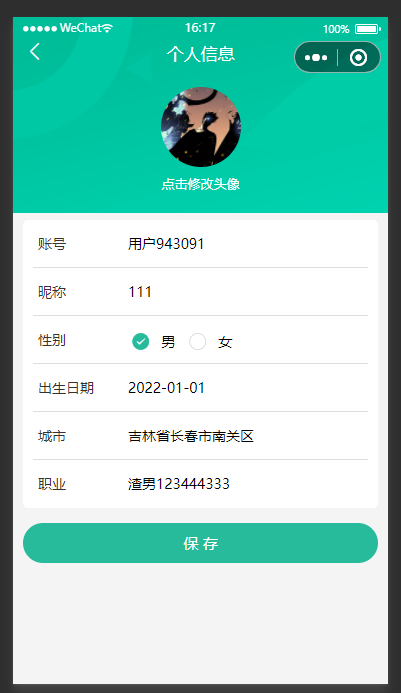
修改个人信息-静态结构
src/pages/my/profile.vue
<template>
  <view class="viewport">
    <!-- 顶部背景 -->
    <view class="navbar" :style="{ paddingTop: safeArea.top + 'px' }">
      <view class="back icon-left"></view>
      <view class="title">个人信息</view>
    </view>
    <scroll-view scroll-y>
      <!-- 头像 -->
      <view class="avatar">
        <image
          mode="aspectFill"
          src="http://static.botue.com/erabbit/static/uploads/avatar_3.jpg"
        />
        <text>点击修改头像</text>
      </view>
      <view class="form">
        <view class="form-item">
          <text class="label">账号</text>
          <!-- 账号名不能修改,用 text 组件展示 -->
          <text>账户名</text>
        </view>
        <view class="form-item">
          <text class="label">昵称</text>
          <!-- 输入框通过 v-model 双向绑定修改数据 -->
          <input />
        </view>
        <view class="form-item">
          <text class="label">性别</text>
          <radio-group>
            <label class="radio">
              <radio value="男" color="#27ba9b" />
              男
            </label>
            <label class="radio">
              <radio value="女" color="#27ba9b" />
              女
            </label>
          </radio-group>
        </view>
        <view class="form-item">
          <text class="label">出生日期</text>
          <picker mode="date" start="1900-01-01" end="2022-01-01">
            <view>{{ "" || "请选择日期" }}</view>
          </picker>
        </view>
        <view class="form-item">
          <text class="label">城市</text>
          <picker mode="region">
            <view>{{ "" || "请选择城市" }}</view>
          </picker>
        </view>
        <view class="form-item">
          <text class="label">职业</text>
          <!-- 输入框通过 v-model 双向绑定修改数据 -->
          <input placeholder="请填写职业" />
        </view>
        <!-- 提交按钮 -->
        <view class="button">保 存</view>
      </view>
    </scroll-view>
  </view>
</template>
<script>
import { mapState } from "vuex";
export default {
  computed: {
    ...mapState(["safeArea"]),
  },
};
</script>
<style lang="scss">
page {
  height: 100%;
  overflow: hidden;
  background-color: #f4f4f4;
}
.viewport {
  display: flex;
  flex-direction: column;
  height: 100%;
  background-image: url(https://static.botue.com/erabbit/static/images/order_bg.png);
  background-size: auto 392rpx;
  background-repeat: no-repeat;
}
.navbar {
  .title {
    height: 40px;
    line-height: 32px;
    text-align: center;
    font-size: 17px;
    font-weight: 500;
    color: #fff;
  }
  .back {
    position: absolute;
    left: 20rpx;
    top: 22px;
    font-size: 23px;
    z-index: 9;
    color: #fff;
  }
}
.avatar {
  text-align: center;
  padding: 20rpx 0 40rpx;
  image {
    width: 160rpx;
    height: 160rpx;
    border-radius: 50%;
  }
  text {
    display: block;
    padding-top: 20rpx;
    line-height: 1;
    font-size: 26rpx;
    color: #fff;
  }
}
.form {
  margin: 20rpx 20rpx 0;
  padding: 0 20rpx;
  border-radius: 10rpx;
  background-color: #fff;
  .form-item {
    display: flex;
    height: 96rpx;
    line-height: 46rpx;
    padding: 25rpx 10rpx;
    background-color: #fff;
    font-size: 28rpx;
    border-bottom: 1rpx solid #ddd;
    &:last-child {
      border: none;
    }
    .label {
      width: 180rpx;
      color: #333;
    }
    input {
      flex: 1;
      display: block;
      height: 46rpx;
    }
    .radio {
      display: inline-block;
      height: 46rpx;
      margin-right: 20rpx;
      vertical-align: middle;
    }
    radio {
      transform: scale(0.7) translateY(-2px);
    }
    picker {
      flex: 1;
    }
  }
}
.button {
  height: 80rpx;
  text-align: center;
  line-height: 80rpx;
  margin: 30rpx 20rpx;
  color: #fff;
  border-radius: 80rpx;
  font-size: 30rpx;
  background-color: #27ba9b;
}
</style>修改个人信息-请求数据
目标:实现个人信息数据查询、数据保存、界面渲染
步骤:
- 封装API
- 封装请求函数,调用API
- 加载后,触发请求函数
- 请求头添加tokn
代码:
1、封装API
src/api/profile.js
/** 获取个人资料 */
export const getProfileAPI = () => request({ url: "/member/profile" });2、封装请求函数
3、加载后,触发请求函数
<script>
import { getProfileAPI } from "@/api/profile";
/* 学习目标:请求个人中心数据  */
export default {
  // 3. 页面加载后发请求
  onLoad() {
    this.loadData();
  },
  methods: {
    // 2. 封装请求函数
    async loadData() {
      const res = await getProfileAPI();
      console.log("res  ----->  ", res);
    },
  },
};
</script>4、请求头添加token
@/utils/http
... 省略其它代码 ...
+ import store from "@/store";
const request = {
  invoke(args) {
 		... 省略其它代码 ...

    args.header = {
      ...args.header, // 保留原本的 header
      "source-client": "miniapp", // 添加小程序端调用标识
+      // 4. 请求头添加tokne
+     Authorization: store.state.user.profile.token,
    };
  },
  complete(res) {
    uni.hideLoading();
  },
};
... 省略其它代码 ...修改个人信息-渲染界面
目标:声明变量、保存数据、渲染界面
// 1. 声明变量保存数据
  data() {
    return {
+     profile: null,
    };
  },

  methods: {
    async loadData() {
      const { result } = await getProfileAPI();
      // 2. 保存数据
+      this.profile = result;
    },
},<template>
<view class="viewport">
... 省略其它代码 ...
<scroll-view scroll-y>
<!-- 头像 -->
<view class="avatar">
- <image mode="aspectFill" />
+ <image mode="aspectFill" :src="profile.avatar" />
<text>点击修改头像</text>
</view>
<view class="form">
<view class="form-item">
<text class="label">账号</text>
<!-- 账号名不能修改,用 text 组件展示 -->
- <text>账户名</text>
+ <text>{{ profile.account }}</text>
</view>
<view class="form-item">
<text class="label">昵称</text>
<!-- 输入框通过 v-model 双向绑定修改数据 -->
- <input />
+ <input v-model="profile.nickname" />
</view>
<view class="form-item">
<text class="label">性别</text>
<radio-group>
<label class="radio">
+ <!-- 💥💥 后台给的就是字符串男和女 -->
<radio
value="男"
color="#27ba9b"
+ :checked="profile.gender === '男'"
/>
男
</label>
<label class="radio">
<radio
value="女"
color="#27ba9b"
+ :checked="profile.gender === '女'"
/>
女
</label>
</radio-group>
</view>
<view class="form-item">
<text class="label">出生日期</text>
<picker mode="date" start="1900-01-01" end="2022-01-01">
- <view>{{ '' || "请选择日期" }}</view>
+ <view>{{ profile.birthday || "请选择日期" }}</view>
</picker>
</view>
<view class="form-item">
<text class="label">城市</text>
<picker mode="region">
- <view>{{ "" || "请选择城市" }}</view>
+ <view>{{ profile.fullLocation || "请选择城市" }}</view>
</picker>
</view>
<view class="form-item">
<text class="label">职业</text>
<!-- 输入框通过 v-model 双向绑定修改数据 -->
- <input placeholder="请填写职业" />
+ <input placeholder="请填写职业" v-model="profile.profession" />
</view>
</template>修改个人信息-打开上传窗口
目标:掌握uni.chooseMedia打开文件上传框
代码:
async onUploadFile() {
  const [, res] = await uni.chooseMedia({
    // 限制数量为:1
    count: 1,
    // 限制上传的文件类型
    mediaType: ["image"],
  });
  console.log("res  ----->  ", res);
},修改个人信息-编辑头像
目标:通过接口,完成头像修改
步骤:
1、封装上传接口
2、获取本地存储路径,调用API
3、更新数据、界面自动变化
代码:
1、封装上传接口:src/api/profile.js
/** 上传头像 */
export const uploadPhotoAPI = (filePath) => {
  return uni.uploadFile({
    url: "/member/profile/avatar",
    // 💥💥 不需要写post
    name: "file",
    // 💥💥 注意参数是一个临时路径
    filePath,
  });
};2、获取本地存储路径,调用API
3、更新数据、界面自动变化
src/pages/my/profile.vue
async onUploadFile() {
-  const [, res] = await uni.chooseMedia({
+  const [, { tempFiles }] = await uni.chooseMedia({
     ... 省略其它代码 ...
   });

   // 2. 获取本地存储路径,调用API
+   const [, { data }] = await uploadPhotoAPI(tempFiles[0].tempFilePath);

	 // 3. 更新数据
   // 💥💥 后台给的是一个JSON字符串
+   this.profile.avatar = JSON.parse(data).result.avatar;
},修改个人信息-编辑昵称-性别-职业
目标:通过接口,完成头像修改
步骤:
1、封装API
2、radio-group通过change事件,完成修改性别
3、 点击保存,绑定提交事件
4、封装提交事件
5、提示用户,回退路由
代码:
1、封装API:src/api/profile.js
export const updateProfileAPI = (data) => {
  return request({ url: "/member/profile", method: "put", data });
};2、radio-group通过change事件,完成修改性别
3、 点击保存,绑定提交事件
<view class="form-item">
          <text class="label">性别</text>
-         <radio-group>
          <!-- 2. 绑定change事件,通过e.detail.value获取 -->
+         <radio-group @change="(e) => (profile.gender = e.detail.value)">
             ...省略其它代码...
          </radio-group>
        </view>

        ...省略其它代码...

        <!--    3. 点击保存,绑定提交事件  -->
-       <view class="button">保 存</view>
+       <view class="button" @click="onUpdateProfile">保 存</view>
</view>4、封装提交事件、调用API
5、提示用户,回退路由
methods: {
    // 4. 封装提交事件、调用API
    async onUpdateProfile() {
      await updateProfileAPI(this.profile);
      // 5. 提示用户,回退路由
      uni.showToast({
        title: "更新成功",
        icon: "success",
        duration: 1500,
      });
      setTimeout(() => {
        uni.navigateBack();
      }, 1000);
    },
}修改个人信息-编辑生日
目标:通过dayjs转换picker提供的数据
步骤:
1、下包dayjs
npm i dayjs2、声明变量end,控制生日最大可选日期
data() {
    return {
      profile: null,
+     end: "",
    };
},3、加载后,获取当前日期,保存到end
onLoad() {
    this.end = dayjs().format("YYYY-MM-DD");
},4、设置Picker的end和value属性
5、通过监听change事件,修改birthday的值
<text class="label">出生日期</text>
    <picker
      @change="handleBirthdayChange"
      mode="date"
      start="1900-01-01"
-     end="2022-01-01"
+     :end="end"
+     :value="profile.birthday"

			// 5、通过监听change事件,修改birthday的值
+     @change="e => (profile.birthday = e.detail.value)"
    >
  		<view>{{ profile.birthday || "请选择日期" }}</view>
  	</picker>
</view>修改个人信息-编辑城市
目标:转换Picker的数据
onLocationChange(e) {

   const { code, value } = e.detail;
   // value 是前端展示的省市区 code是后台需要的编码
   this.profile.fullLocation = value.join("");
   // code 是传递给后端的编码
   this.profile.provinceCode = code[0];
   this.profile.cityCode = code[1];
   this.profile.countyCode = code[2];
 },